
 Posted by
When it comes to storing files online, Google Drive 2025 has become the go-to solution for millions of people worldwide. Whether you’re on your phone, tablet, or computer, it gives you a safe place to keep photos, videos, documents, and everything in between. But Google Drive isn’t just a storage box—it’s also packed with collaboration tools that make teamwork easy, no matter where you are.
In this guide, I’ll walk you through everything you need to know about Google Drive 2025 download, from managing your files to syncing them with your device.
Why Choose Google Drive 2025?
Think about it: how many times have you lost an important file because your computer crashed or your phone storage filled up? With Google Drive 2025, you don’t have to worry about that. Your files live safely in the cloud, protected by Google’s security, and you can access them anytime.
But storage is just the start. Real-time collaboration is built in, meaning multiple people can edit the same document together without emailing versions back and forth.
How to Download Protected Videos from Google Drive
Downloading videos from Google Drive in 2025 has been made simpler and more secure. Here’s the right way to do it:
Open Google Drive and locate the video you want.
Right-click on the file to open its options.
Select Download to save it directly to your device.
Note: If the owner has disabled downloading, you’ll need their permission first. Avoid using unofficial extensions or hacks—they violate Google’s terms and can put your account at risk.
Deleting Files from Google Drive
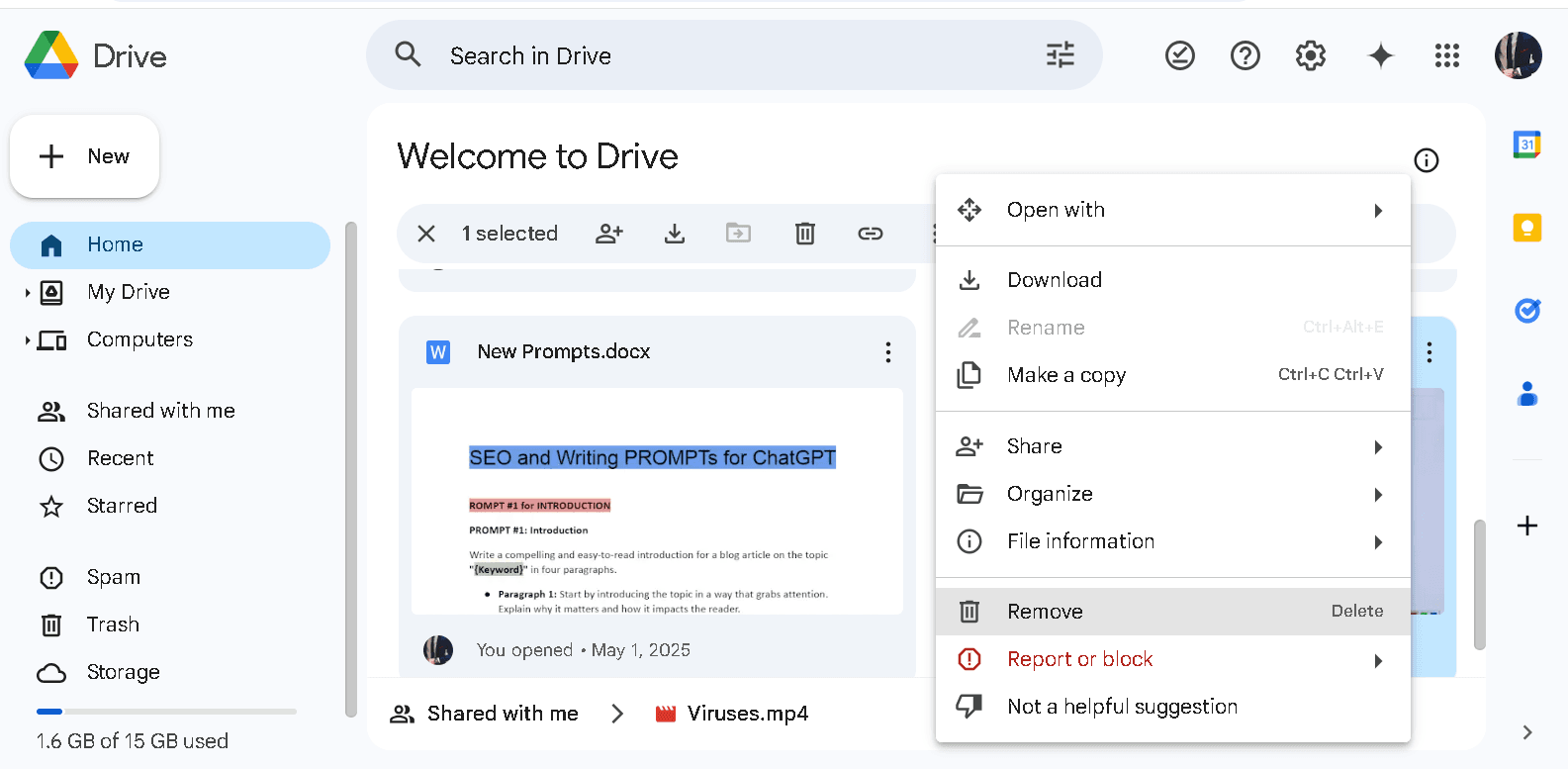
Running out of storage? Here’s how you can clean up space:
Open Google Drive and find the file you want to delete.
Right-click and select Remove.
The file goes into Trash.
To permanently delete it, open Trash, right-click again, and select Delete forever.
Keep in mind: deleting a file only removes it from your account—it won’t disappear from shared users’ drives.
Uploading Photos to Google Drive
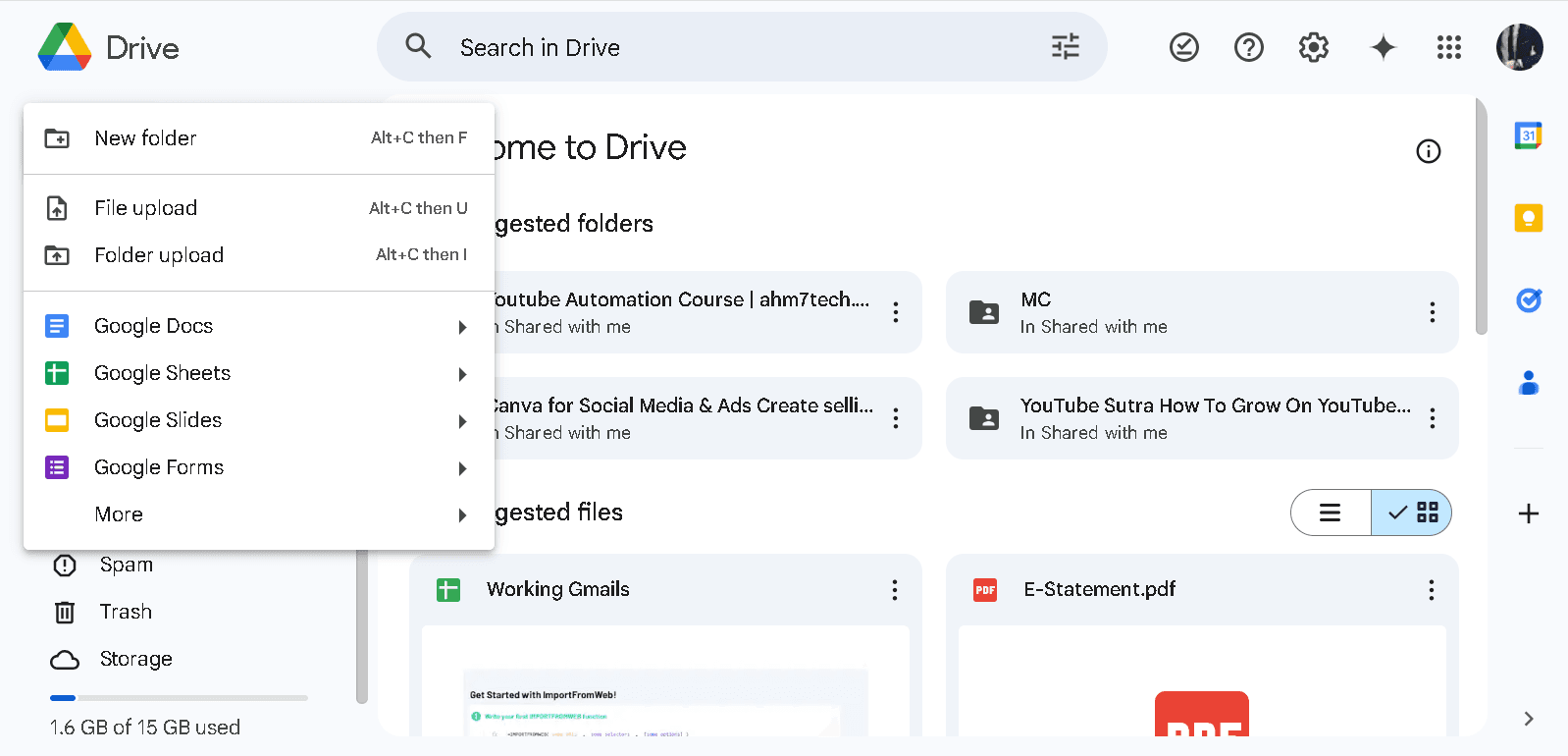
Adding pictures is quick, whether you’re on a computer or mobile:
On Desktop:
Open Google Drive.
Click New → File Upload.
Select the image from your PC and upload.
On Mobile:
Open the Google Drive app.
Tap the “+” icon.
Choose Upload and select your photos from the gallery.
This way, your photos stay safe, backed up, and easy to access across devices.
Adding Google Drive to File Explorer
Want quicker access? You can integrate Google Drive directly into File Explorer (Windows) or Finder (Mac).
Sign in with your Google account.
Install Google Drive for Desktop.
Once connected, your Drive folder shows up like a regular folder.
- From there, you can drag and drop files just like you do locally. Plus, offline syncing makes it possible to work without an internet connection, and changes update automatically once you’re back online.
System Requirements
Before downloading, make sure your device meets these basic requirements:
Windows
- OS: Windows 7 or later
- CPU: 1 GHz or faster
- RAM: 4 GB
- Disk Space: 3 GB free
- Display: 1366 x 768 or higher
macOS
OS: macOS 11.0 or newer
Android
OS: Android 8.0 or newer
FAQs
Q1. How do I download Google Drive 2025 on Windows?
To download Google Drive 2025 on Windows, visit the official Google Drive page, select the Windows version, and install it. Once installed, sign in with your Google account to start syncing files.
Q2. Can I use Google Drive 2025 offline?
Yes. With Google Drive for Desktop, you can enable offline mode. This allows you to access, edit, and organize files even without the internet. Once you reconnect, all changes are synced automatically.
Q3. How do I download a video from Google Drive if the option is disabled?
If the download option is disabled, you need to request permission from the file owner. Using third-party extensions or hacks violates Google’s terms and may put your account at risk.
Q4. How do I permanently delete files in Google Drive 2025?
First, remove the file from your Drive by right-clicking and selecting Remove. Then, go to the Trash, right-click again, and choose Delete forever to clear it permanently.
Q5. How much free storage does Google Drive 2025 offer?
Google Drive provides 15 GB of free storage across Google Drive, Gmail, and Google Photos. You can upgrade to Google One for additional space.
Conclusion
If you’re looking for a reliable way to keep your files secure, share them easily, and sync across devices, Google Drive 2025 download is a must-have. With seamless collaboration, strong security, and smooth file management, it’s more than just cloud storage—it’s your digital workspace.
Download Google Drive
Get the latest version for your device—safe & official links.